Linux Apps That Maybe Run
Latest update:
According to some prominent fellows, whom I won't name to protect the
guilty, the only viable way to distribute software for Linux is to
ship a container. Not to make an rpm/deb & serve it from a repo, like
some insignificant companies that control half of the Internet do, but
to collect all (or most) dependencies & put them alongside the
application. Only this way, experts say, guarantees a high probability
of surviving in the Linux wilderness.
Another set of leading figures argue that shipping a container is
necessary but not sufficient: in the days of rogue AI agents &
catastrophic vulnerabilities hiding in every software corner, an
application should (some insists on the word must) be incapable of
doing anything without the user's permission.
I thought about that a little, & came to the conclusion that a
layperson couldn't care less. I'm not talking about a guy who feels
personally offended when an ntp client dares to send a udp packet
without asking first, I'm talking about an individual who downloads an
"app" not to enjoy perusing a granular permission model, but to
accomplish a task.
I noticed how not a few Windows developers are at a loss to what to make
of Linux software distribution models. This post is for them.
Not a GUI
Theoretically, if you write simple network microservices, you can
abandon all 3rd-party libraries, even libc itself, & stick to syscalls
of the Linux kernel ABI. As long as Linus is in charge, your programs
will always work.
Out of curiosity, I once tried to write a simple nolibc TCP server &
described the
experience. (For
convenience, the text is in Ukrainian.)
Now, let's get back to real life.
DLLs & sonames
In the Linux world a DLL is called a shared library. A plain stock
Fedora Live ISO with no developer tools installed, contains thousands
(3977 in f44) of them.
The 2 major Linux GUI toolkits (GTK & Qt) use a multitude of 3rd-party
shared libraries that they don't control, & when you link against a
GUI library in a particular distro, there is 0 guarantees that your
program will work in the next distro release. Even if the shared
libraries of the GUI toolkit stay the same, some transitive dependency
may acquire a soname bump, & a dynamic linker will refuse to run
your program.
A shared library named foo has actually several names, that look
different to various library consumers:
- you use
-lfoo argument when you invoke a linker to link your
program against the foo library;
- during that building step, the linker searches for libfoo.so file
(in a set of known directories);
- while the source code of the library could live across many files of
arbitrary names, a build step that produces the library itself, puts
the result in libfoo.so.x.y.z file.
- when you invoke your program, the dynamic linker searches for
libfoo.so.x file (in a set of known directories).
The last name, libfoo.so.x, e.g., libfoo.so.3, is called the
soname, & contains the major version number. Thus, the infamous
soname bump means an increment of that number, due to incompatible
changes in ABI. As soon as it happens, you're required to rebuild your
program. On certain occasions you may cheat, symlinking libfoo.so.3
to a new libfoo.so.4, but no user does that, your application just
stops working after an OS update.
Here is an example for giflib package on Fedora. As usual, to
irritate newcomers, the library is split between 2 packages:
$ rpm -ql giflib giflib-devel | grep .so | xargs stat -c %N
'/usr/lib64/libgif.so.7' -> 'libgif.so.7.1.0'
'/usr/lib64/libgif.so.7.1.0'
'/usr/lib64/libgif.so' -> 'libgif.so.7'

$ objdump -p /usr/lib64/libgif.so.7.1.0 | grep -i soname
  SONAME               libgif.so.7
The program ld.so (the dynamic linker, at the time of writing
/lib64/ld-linux-x86-64.so.2) looks for libgif.so.7. A linker,
during a build step, uses libgif.so (no version number). The latter
file is absent in the user-faced giflib package.
Living on the edge
If you listen to proponents of assorted form of containerisation long
enough, you may think that soname bumps (or other events of ruinous
nature) happen every week. In reality, even rather old versions of
fairly complex programs like Google Chrome, despite being designed to
be updated daily, run ~fine on current Linux.
E.g., I fished out a .deb variant of Chrome 71 (Dec of 2018), unpacked
it & successfully ran the ancient browser on Fedora 44. It
was linked against GTK3 (modern Chrome doesn't use GTK), a toolkit
that any distro will continue to ship for at least 20 years.
Not all applications are that lucky, though. If you have a program
compiled during the forgotten v1.0.x OpenSSL years, chances that a
regular user would have skills to find (or more precisely, bother to
look for, unless extremely motivated) a compatible .so file is
practically nil.
Here comes a point, where 2 schools of thought appear:
You rely on dependencies target distros provide, rebuilding the
program when the time comes. The movement attracts too few
adherents nowadays, & we won't talk about it, for this
philosophical tradition is considered passé in high society.
You protect yourself from the disappearance of old shared libraries
from the repos by shipping the most fragile of them with the
program. How do you know which ones should be brought in? You
don't, & resort to guessing.
AppImage
In the Windows world you can put necessary DLLs in the same directory
with the executable. In Linux, by default, the dynamic linker searches
for .so files exclusively in a predefined set of directories,
reconfigurable only by a superuser.
A temporal (meaning, it has a long life) fix for changing the
directory lookup is to invoke ld.so manually, or set LD_LIBRARY_PATH
env variable. This requires a tiny shell wrapper for a program
executable, & this is what every developer starts with when he thinks
about the chilling software distribution on Linux.
What do you do after putting everything under 1 directory? In the
distant past, folks would create a .tar.gz file with a content like
so:
foobar/ # many files in this directory
foobar.sh
README
The user would unpack the archive, ignore the readme, & run foobar.sh.
By today's standards this is regarded as too confusing. First of all,
what is this .tar.gz, a Japanese nesting doll? Second, a user vainly
tries to start foobar.sh from within a GUI archiver app.
In 2010s, there was a popular feeling that "something has to be done"
about motley tarballs, hence a bunch of solutions appeared. One of the
few survivors is AppImage, even though back in ~2016, when it hit the
Linux scene hard, many decided it was "unnecessarily complicated".
I don't find it complicated at all. To show how it works, we'll ①
write a hello world program that acquires the word "World" from a
shared library, ② make an "appimage" from the program.
Our source code:
$ cat libfoo.c
char* greeting() { return "World"; }
$ cat app.c
#include <stdio.h>
char* greeting();
int main() { printf("Hello, %s!\n", greeting()); }
We compile it like so:
cc -fPIC   -c -o libfoo.o libfoo.c
cc -shared -Wl,-soname,libfoo.so.1 -o libfoo.so.1.0.0 libfoo.o
ln -sfn libfoo.so.1.0.0 libfoo.so.1
ln -sfn libfoo.so.1 libfoo.so
cc   -L. -lfoo  app.c   -o app
The app consists of an executable & a shared library with soname
libfoo.so.1:
$ stat -c %N *.so* app
'libfoo.so' -> 'libfoo.so.1'
'libfoo.so.1' -> 'libfoo.so.1.0.0'
'libfoo.so.1.0.0'
'app'
If we run it as is, it predictably fails:
$ ./app
./app: error while loading shared libraries: libfoo.so.1: cannot open shared object file: No such file or directory
So we write a wrapper:
$ cat AppRun
#!/bin/sh

dir=$(dirname "$(readlink -f "$0")")
export LD_LIBRARY_PATH=$dir
exec "$dir/app" "$@"
An appimage is a squashfs image with a prepended "runtime". The latter
is a static ELF executable that mounts its payload (the squashfs
image) & runs a program with a hard-coded name "AppRun". At no point
root is required.
You make a ready-to-go runnable "appimage" in 3 steps:
Create a squashfs image app.sqsh:
 $ mksquashfs app AppRun libfoo.so.* app.sqsh -quiet -no-progress
 $ unsquashfs -l app.sqsh
 squashfs-root
 squashfs-root/AppRun
 squashfs-root/app
 squashfs-root/libfoo.so.1
 squashfs-root/libfoo.so.1.0.0
Catenate the "runtime" with it:
$ cat type2-runtime app.sqsh > app.appimage
Add the executable bit:
$ chmod +x app.appimage
That's it.
$ ./app.appimage
Hello, World!
Obviously, the .appimage file extension isn't strictly required. You
can use .exe if you're so maliciously inclined.
GUI archivers won't show the content of an appimage, therefore
bewildered users cannot start AppRun from within the archiver.
The general disadvantages of the approach are:
- a downloaded .appimage from the web won't have an executable bit;
- it requires a suid
fusermount utility on the host;
- there is no requirements for sandboxing of any kind: by downloading
an .appimage you can't know without extracting its payload whether
the author thought about one;
- no protection from missing dependencies: if you didn't put a
necessary library inside the image, you're in the same boat with
the suppliers of a mere tarball.
Still, for me it's the je ne sais quoi that makes the AppImage format
charming. The construct is so simple to implement, that you can
replace the static runtime binary with a 22-lines shell script:
$ cat type2-lunch.sh
#!/bin/sh

set -e
self=`readlink -f "$0"`
offset=$(grep -abo -m1 "$(printf 'hsqs\002')" "$self" | cut -d: -f1)

[ "$offset" ] || { echo No squashfs image attached 1>&2; exit 1; }
[ "$PRINT_OFFSET" ] && { echo "$offset"; exit 0; }

tmp=`mktemp -d /tmp/appimage.XXXXXX`

clean() {
    set +e
    fusermount -u "$tmp"
    rmdir "$tmp"
}

trap clean 0 1 2 15

squashfuse_ll -o offset="$offset" "$self" "$tmp"
"$tmp"/AppRun "$@"
exit $?
It looks for a magic number position & uses it as an offset when
mounting an image. The step #2 from above thus can be replaced as:
$ cat type2-lunch.sh app.sqsh > app.appimage
Not a container
Unfortunately, DLLs are not the only dependencies you'll
encounter. GTK programs, for example, won't function properly or even
start without compiled GSettings schemas, MIME database caches, icon
sets, & so on.
This is where the proponents of containerisation smile very widely: you
can copy beloved .so files all day long, but when any of them have a
hard-coded path to /lib64/gdk-pixbuf-2.0/2.10.0/loaders.cache file,
all your backbreaking work becomes useless if a target host lacks one.
Without resorting to heavyweight Docker-like hammers, you can employ
mount namespaces, a feature that has been in Linux > 20 years, but
only gained momentum among regular folks since the rise of
Flatpak. One of the core components of the latter is a sandboxing
utility called bwrap. From a user perspective, it does a glorified
chroot(2), but without the need of superuser privileges. bwrap is
shipped by default in all desktop variations of 3 major distros. You don't need to
touch or rely on Flatpak to use it.
If we make a minimal directory tree
for the hello world program above (this includes the dynamic linker
too)
container
├── bin -> usr/bin
├── lib64 -> usr/lib64
└── usr
    ├── bin
    │   └── app
    └── lib64
        ├── ld-linux-x86-64.so.2
        ├── libc.so.6
        ├── libfoo.so -> libfoo.so.1
        ├── libfoo.so.1 -> libfoo.so.1.0.0
        └── libfoo.so.1.0.0
then we can run our "app" executable without additional wrappers that
export LD_LIBRARY_PATH:
$ bwrap --bind container / /bin/app
Hello, World!
How far you can go with that? To prove to myself that this works not
only for toy programs, I employed Fedora's dnf repos to fetch all the
dependencies for Celluloid (an mpv frontend) in such a way, that a
resulting "guest" included the necessary libraries for hardware video
decoding & pipewire/pulseaudio/alsa communication with the host.
It worked, although the size of such a "guest" failed to inspire:
$ du -hs container/
993M    container/
If you zip it, it contracts to 358 MB. How does this compare to a
Flatpak version?
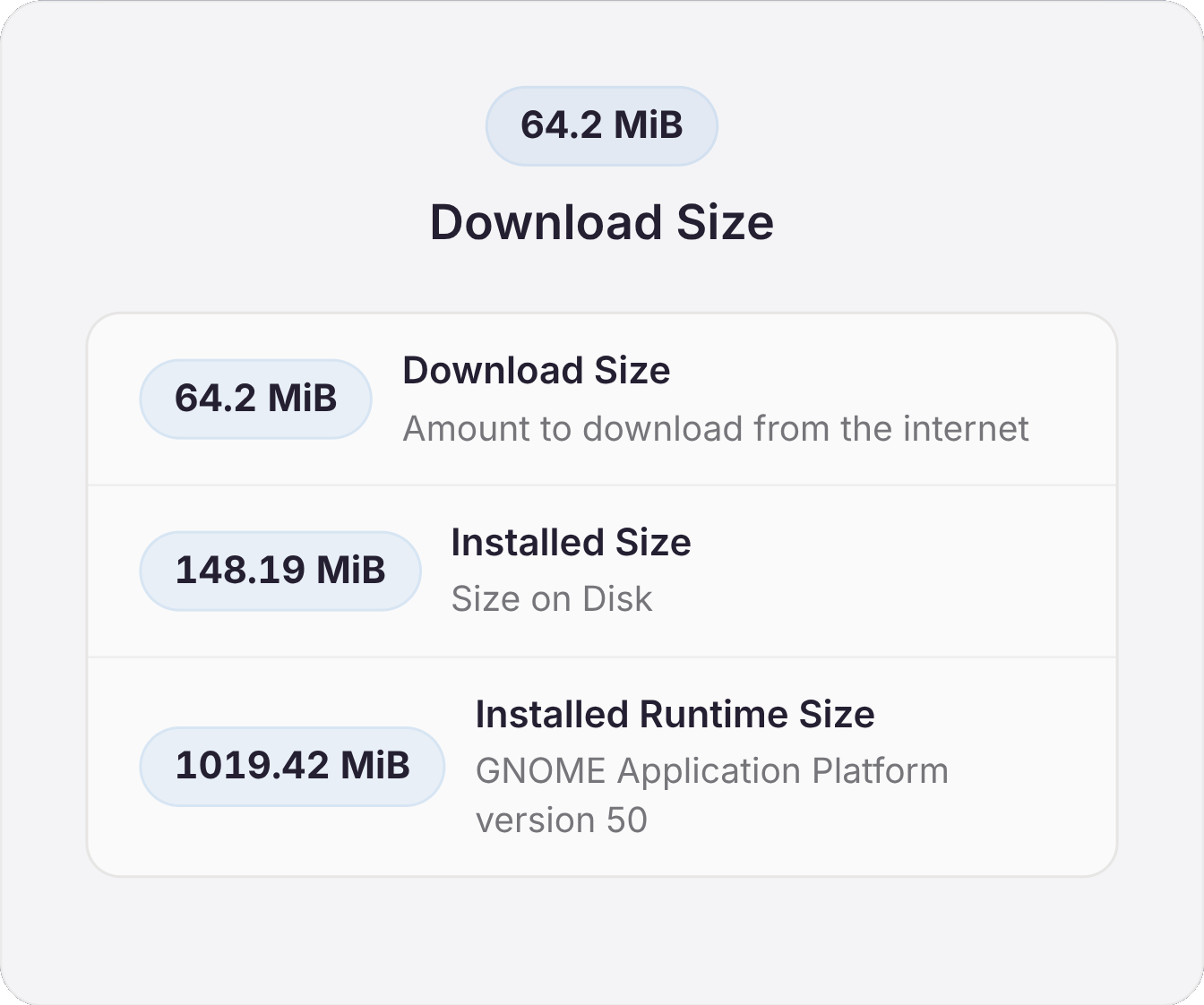
Although the advantage of Flatpak here is in decoupling of what they
call "runtime" from an application itself, I'm not a huge fan of it
for the amount of bloat it brings
into a Linux desktop mess.
Anyhow, the fake container approach could be a solution if you don't
care about disk space. The github example with which I did the mpv
experiment, contains several spec examples for more lightweight
programs.
For the sake of pedantry, I also tried the 2026 celluloid "container"
on a Debian 9.0 (2017) VM with its 4.9.0 kernel. I had to compile
bwrap myself & set sysctl kernel.unprivileged_userns_clone to 1, but
the thing worked flawlessly. No rational user, of course, will ever do
that for any application, but it's the principle that counts.
$ f=google-chrome-stable_71.0.3578.98-1_amd64.deb
$ sha1sum $f | awk '{print $1}'
a4bffb66d9fe055a9baab366d4dd94c96ce47d24
$ dpkg-deb -x $f .
$ opt/*/*/google-chrome --no-sandbox --user-data-dir=`pwd`/1
- Ubuntu, Fedora, Debian.
Tags: ойті
Authors: ag