Emacs on Windows
Latest update:
To combat a perceived sluggishness (compared to the Linux version),
you need to turn on 2 features: native compilation and
tree-sitter. Both are half-enabled: the support is compiled-in, but
they don't work properly without a suitable environment. The latter
you get automatically on any sensible Linux distro, while Windows
setup requires additional steps.
(There are no (setq w32-make-it-fast t) secret settings in this
post.)
Native compilation
Without it, Emacs is barely usable in any Windows 11 XXhY release. If
you don't switch this apparatus on, so to speak, then better forget
about Emacs, & move on to greener pastures.
It's hard to overstate how much JIT shakes things
up. The official .zip ships Lisp code that was natively compiled in
advance, so Emacs runs it at full speed, but can't necessarily
natively compile 3rd-party code. Hardly anyone uses Emacs in emacs -Q
fashion, hence without native-comp, installing any complex ELPA/Melpa
package means mediocre performance.
To get a sense of the irrelevant figures we are talking about here, take a look
at the graph of calculating a Fibonacci sequence in Elisp with &
without NC:
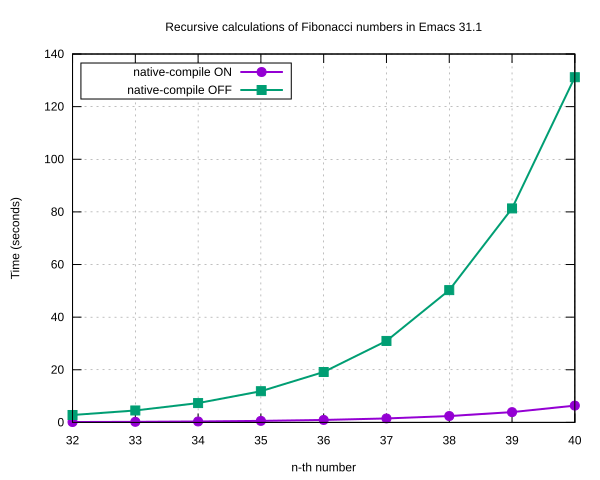
(A script that produced the numbers above.)
NC requires 2 things:
- libgccjit library.
- GCC compiler, linker & assembler.
Items 1 & 2 must come from roughly the same GCC version suite Emacs was compiled
with. Do you see a problem here? On Linux, a package manager installs
a compiler of a ~similar version to the one used to build other
packages, including Emacs. When a distro is in sync, everything works
automatically: libgccjit invokes the compiler with the corresponding
binutils tools, & Emacs happily runs code native to your CPU.
None of this is true by default in Windows.
First, after you download the .zip (or install the editor via
scoop, or whatever), you need to hunt down exactly which compiler was
used to make the Windows bundle.
ELISP> system-configuration
"x86_64-w64-mingw32"
gives us the type, but no version string. The only reliable way I found
was to look inside the executable:
powershell> strings emacs.exe | sls 'GCC: \(' | select -f 1
GCC: (Rev5, Built by MSYS2 project) 16.1.0
Second, you find that libgccjit-0.dll is missing. Meaning,
even though NC was technically enabled during the build, the car can't
move now, because its battery was nicked pulled out.
The Emacs repo contains some scripts presumably used to generate the
.zip, & one of them has the following soothing lines:
# libraries we never include
DLL_SKIP=["libgccjit-0.dll"]
For this particular Emacs 31.1, I manually fished out the dll from the
msys2 archive.
Third, you need to decide which mingw toolkit to get that would be
compatible with your libgccjit-0.dll. I downloaded a minimal
x86_64-16.1.0-release-posix-seh-ucrt-rt_v14-rev1 variant from
github.com/niXman. There has got to be an edition somewhere that
also contains libgccjit, but searching for one was too tedious.
Setup
The coveted libgccjit-0.dll gets loaded dynamically on start-up if
Emacs finds it. Keeping the dll next to emacs.exe works. (Modifying
dynamic-library-alist instead doesn't.)
Here comes a possible explanation of why libgccjit-0.dll isn't
shipped in the .zip: after the dll is loaded, Emacs convinces itself
that
ELISP> (native-comp-available-p)
t
and attempts to asynchronously compile installed 3rd-party code, while
simultaneously continuing to read your ~/.emacs config. If there is
no "compatible" gcc+as+ld can be found, the action fails with a scary error.
I decided against adding yet another compiler to PATH, & extracted the
mingw toolkit into ~/.emacs.d/windows. For that to work, we ought to
modify the env var only for Emacs & its children, & do it very early
in the editor's boot process:
> cat $env:APPDATA/.emacs.d/early-init.el
;; -*- lexical-binding: t; -*-
(let ((mingw (expand-file-name "~/.emacs.d/windows/mingw64/bin")))
  (when (and (eq system-type 'windows-nt) (file-exists-p mingw))
    (let ((paths (parse-colon-path (getenv "PATH"))))
      (add-to-list 'paths mingw)
      (setenv "PATH" (string-join (delq nil paths) path-separator))
      (add-to-list 'exec-path mingw))))
(Why there is no standard (add-to-path STRING) function that itself
handles all the fiddling with the lists, I don't know.)
Now, when you start Emacs, it should silently begin JIT compilation
(the results are visible in ~/.emacs.d/eln-cache directory).
Tree-sitter
To enjoy some of those exciting new major modes everyone is talking
about, activate a special mapping from the "traditional" to the
"new":
(defun my-native-comp-available-p()
  (and (executable-find "as") (native-comp-available-p)))

(when (my-native-comp-available-p)
  (setq major-mode-remap-alist
        '((mhtml-mode . mhtml-ts-mode)
          (js-json-mode . json-ts-mode)
          (ruby-mode . ruby-ts-mode)
          (c-mode . c-ts-mode)))
  (add-to-list 'auto-mode-alist '("\\.yaml\\'" . yaml-ts-mode)))
We check whether tree-sitter would even work (a more robust test would
include treesit-available-p & a lookup for the "git" executable),
because a compatible compiler toolchain is required as well.
It's rather pointless to set up tree-sitter without having native
compilation working. While they are orthogonal, they both employ the
same toolchain dependency.
Reroute to Linux
All of the above could also be a waste of time. No matter how much JIT
Emacs does, how hard it tries, NTFS with the NT I/O scheduler makes
anything involving lots of small processes & files choke like a snake
eating an elephant.
Instead, people suggest using WSL2, Emacs inside VMWare, or
carrying around an SBC:
LIBERTYPRIME_1776 1 point 2019-07-11
when i use emacs on windows i do it via a raspberry pi.
use it internet via ethernet to usb converter and use putty to connect
to it and run emacs, use TRAMP to modify stuff on windows.
-
The Elisp manual says "The resulting speedup … is usually 2.5 to 5
times faster than the corresponding byte-compiled code."
- That's a quote.
Tags: ойті
Authors: ag